
Are you dreaming of a sandy beach or a busy city but your wallet is saying “maybe next year”? We have all been there. Trying to find a flight that doesn’t break the bank can feel like a full-time job. You click through dozens of tabs, get confused by prices, and end up feeling tired. But what if I told you there is a secret weapon used by travel experts worldwide? That weapon is Skyscanner.
In this guide, I will show you exactly how to use Skyscanner to grab the best deals. I have used this tool for years to travel to over 20 countries, and it has saved me thousands of dollars. Whether you are a student on a budget or a family looking for a summer break, this “people-first” guide is for you. Let’s dive into the world of smart travel and make your 2026 adventures happen!
What is Skyscanner and Why Should You Use It?
At its heart, Skyscanner is a travel search engine. Think of it like Google, but just for flights, hotels, and car rentals. It does not sell you tickets directly. Instead, it looks at hundreds of airlines and travel sites to show you all the prices in one place. This saves you from having to visit every airline website yourself.
The best part? It is completely free. Skyscanner makes its money by getting a small fee from the airlines when you book. This means you get the most honest prices available. In 2026, airfare pricing is more complex than ever, but this tool keeps it simple for everyone.
Key Benefits of Using the Platform
| Feature | Benefit for You |
| Price Comparisons | See deals from big airlines and budget carriers side-by-side. |
| “Everywhere” Search | Find the cheapest destination from your home airport. |
| Monthly View | Spot the exact day that offers the lowest fare. |
| No Hidden Fees | The price you see is usually the price you pay. |
Master the “Everywhere” Search for Maximum Savings
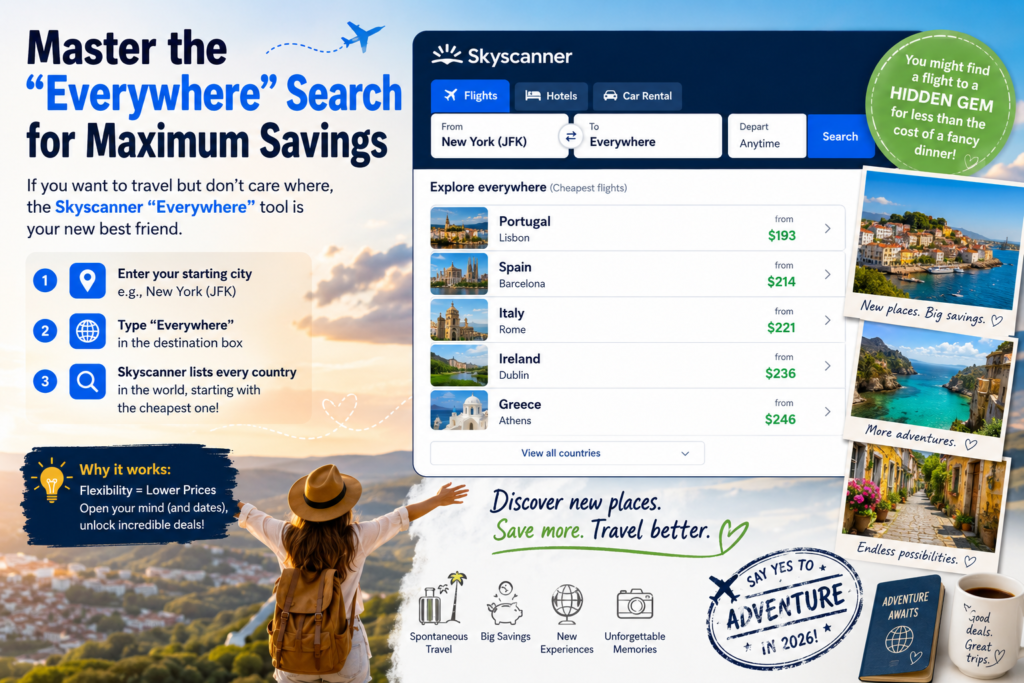
If you want to travel but don’t care where, the Skyscanner “Everywhere” tool is your new best friend. I use this when I have a week off but no specific plan. You just type in your starting city and put “Everywhere” in the destination box.
Skyscanner will then list every country in the world, starting with the cheapest one. You might find a flight to a hidden gem in Europe for less than the cost of a fancy dinner! This is the ultimate way to discover new places while keeping your savings account happy. It encourages “spontaneous travel,” which is a huge trend for 2026.
How to Find the Cheapest Month to Fly
Timing is everything in the travel world. Sometimes flying on a Tuesday instead of a Friday can save you $200. On Skyscanner, you don’t have to guess. When you pick your dates, choose the “Whole Month” option.
This opens a calendar view where you can see the price for every single day. If you are even more flexible, you can select “Cheapest Month.” This tool scans the entire year to tell you when that flight to Tokyo or Paris is at its lowest point. It is a game-changer for budget-conscious explorers.
Setting Up Price Alerts: Let the Deals Come to You
Waiting for a price to drop can be stressful. You don’t want to check the app every hour! That is why the Skyscanner Price Alert feature is so helpful. Once you search for a flight, you can tap the little bell icon.
Now, Skyscanner will watch that flight for you. If the price goes up or down, you get an email or a phone notification. I once saved $300 on a flight to London because I got an alert while I was eating lunch. I booked it immediately and felt like a travel genius!
Exploring Multi-City Routes for Long Adventures
Are you planning a big trip across Asia or Europe? Don’t just book simple one-way tickets. The multi-city search on Skyscanner lets you add several stops to one itinerary. This is often much cheaper than buying separate tickets.
For example, you could fly from New York to London, then Paris, then head back home from Rome. This “open-jaw” flying style is a great way to see more of the world. In 2026, we see more people doing “slow travel,” and this tool makes those long journeys much easier to organize.
Use Filters to Find the Perfect Flight
Not all cheap flights are good flights. A $50 flight that has a 20-hour layover might not be worth it! Skyscanner has amazing filters to help you avoid travel nightmares. You can filter by:
- Stops: Choose “Direct Only” if you hate airports.
- Duration: Filter out flights that take too long.
- Airlines: Stick to the brands you trust or have loyalty points with.
- CO2 Emissions: Look for the “Greener Choice” label to travel more sustainably.
Using these filters ensures your trip is comfortable, not just cheap.
Booking with Confidence
When you use Skyscanner, you will see ratings for different travel agencies. This is part of the “Trustworthiness” factor. Always look for sites with 4 or 5 stars. If a deal looks too good to be true on a site you’ve never heard of, be careful.
I always suggest booking directly with the airline through the Skyscanner link if the price is similar. It makes it easier to change your flight later if something goes wrong. In 2026, having that direct connection to the airline is a smart move for any traveler.
Don’t Forget About Hotels and Car Rentals
While most people know Skyscanner for flights, it also handles where you sleep and how you get around. After you find your flight, you can search for hotels in the same app.
They even have a “flexible cancellation” filter for hotels, which is a lifesaver if your plans change. For car rentals, they compare all the big names like Hertz and Avis alongside local companies. It is truly a one-stop-shop for your entire vacation.
2026 Travel Trends: What to Look For
According to the latest data, 2026 is the year of “personal journeys.” People are looking for authentic experiences. Skyscanner has adapted by highlighting unique “destination hotels” and “off-peak” mountain escapes.
We are also seeing more “Glowmads”—travelers who plan trips around wellness and skincare routines! No matter what kind of traveler you are, using Skyscanner helps you find the specific niche that fits your personality and your budget.
Why You Should Download the Skyscanner App
The website is great, but the Skyscanner app is where the real magic happens. It is perfect for searching while you are on the bus or waiting for a friend. The “Explore” tab in the app often features curated deals based on your location.
Plus, having your price alerts go straight to your lock screen means you will never miss a “mistake fare” again. These are super low prices that happen when an airline makes a typo—you have to be fast to catch them!

Summary Table: Skyscanner Quick Tips
| Task | Best Tool to Use | Why It Works |
| Find any deal | “Everywhere” Search | Shows the cheapest places globally. |
| Save on a specific route | Price Alerts | Notifies you the second the price drops. |
| Choose the right day | Calendar/Chart View | Visualizes price changes over a month. |
| Travel Green | Greener Choice Label | Helps you find flights with lower CO2. |
Conclusion
Finding cheap travel doesn’t have to be a headache. By using Skyscanner, you put the power of a professional travel agent right in your pocket. Remember to be flexible with your dates, use the “Everywhere” tool for inspiration, and always set those price alerts!
Travel is about making memories, not stressing over spreadsheets. So, where are you going next? Head over to Skyscanner and see what’s waiting for you!
Frequently Asked Questions
1. Is Skyscanner safe to use for booking?
Yes! It is a highly trusted search engine. However, remember that you usually book on a third-party site or with the airline. Always check the star ratings of the provider on the results page.
2. Does Skyscanner charge a booking fee?
No, the service is free for travelers. The price you see on the results page includes all mandatory taxes and fees.
3. When is the best time to book a flight on Skyscanner?
For 2026, the “Goldilocks Window” is usually 1-3 months before a domestic flight and 2-8 months for international trips. Use Price Alerts to catch the sweet spot!
4. Can I find “Last Minute” deals on Skyscanner?
Yes! Use the “Everywhere” search and select “Current Month” to see where you can go for cheap right now.
5. How do I use the “Greener Choice” feature?
Look for the leaf icon next to flight results. This indicates flights that emit less CO2 than average for that specific route.
6. Does searching in “Incognito Mode” actually lower prices?
While many people believe this, modern airline pricing is based on demand and algorithms, not just your cookies. However, it never hurts to be private! Using Skyscanner ensures you see the broad market price regardless.